ReportDesigner
리얼리포트 웹 디자이너 옵션과 함께 리포트 디자이너 객체를 생성합니다. 리얼리포트 웹 디자이너 사용하기를 참고하세요.
생성자
new RealReport.ReportDesigner(container, designerOptions);ReportDesigner 인자
| 이름 | 타입 | 필수여부 | 설명 |
|---|---|---|---|
| container | string | HTMLDivElement | yes | 리얼리포트 웹 디자이너가 렌더링될 컨테이너 정보 (div 요소 혹은 id 문자열) |
| designerOptions | ReportDesignerOptions | no | 리얼리포트 웹 디자이너 생성 옵션 |
ReportDesignerOptions Callback
웹 디자이너 옵션의 Callback을 구성하면 웹 디자이너에서 사용할 양식 리소스 목록을 구성하고 양식 데이터를 저장하는 핸들러를 작성할 수 있습니다.
getReportListCallback
웹 디자이너의 Open 메뉴를 클릭할 때 호출되는 Callback
- 타입:
() => Promise<ReportListSource> - ReportListSource 타입 정보
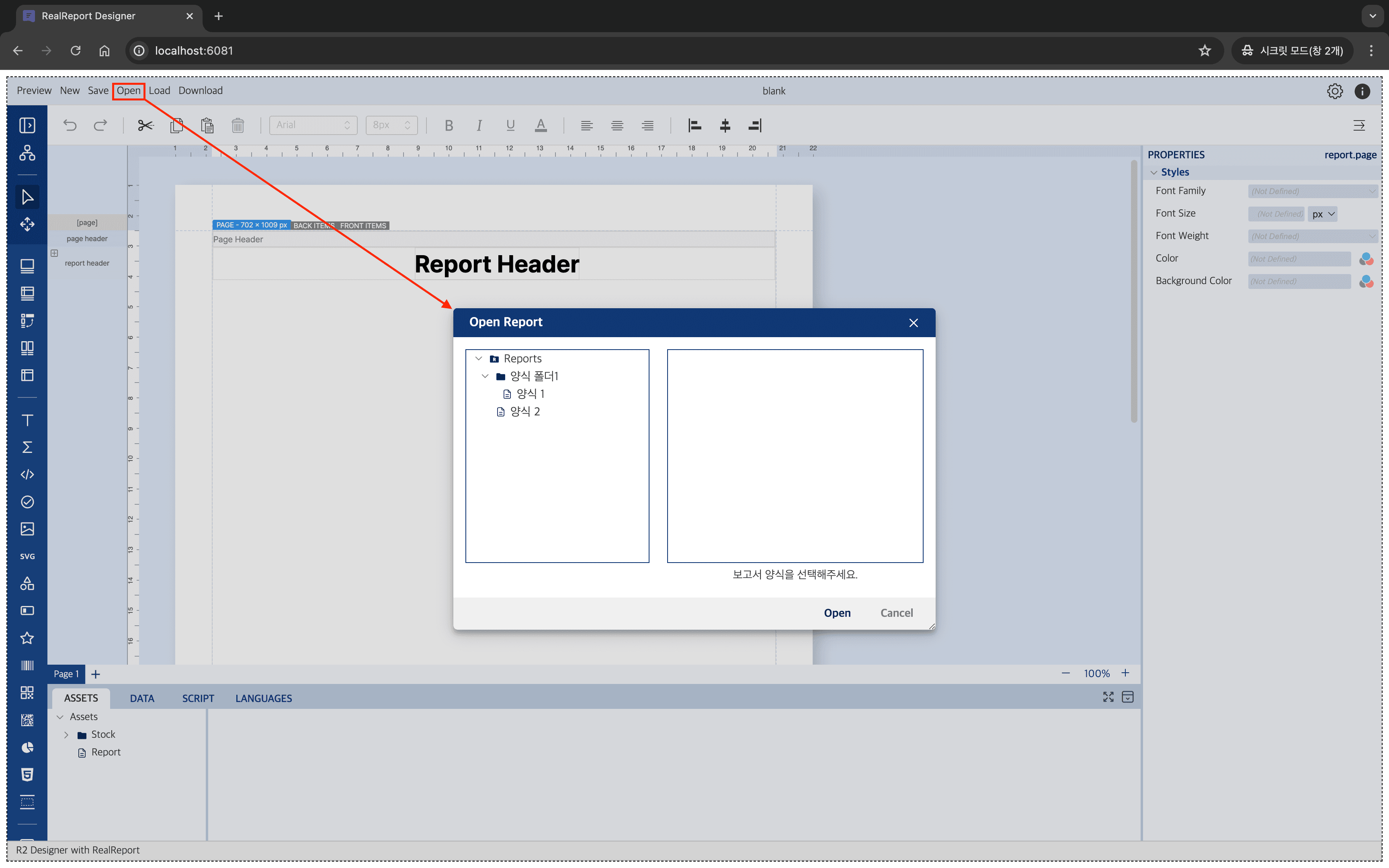
외부에 저장해놓은 보고서 양식들을 getReportListCallback을 사용하여 양식 목록을 반환해주면 Open 메뉴에서 보고서 양식 목록을 구성할 수 있습니다.
코드 예시
/**
 * 리포트 양식 목록을 제공하는 코드
 */
async function getReportListCallback() {
    const reportList = [
        {
            type: 'group',
            name: '양식 폴더1',
            children: [
                {
                    type: 'report',
                    name: '양식 1',
                    id: '1',
                },
            ],
        },
        {
            type: 'report',
            name: '양식 2',
            id: '2',
        },
    ];

    return reportList;
}

const designer = new RealReport.ReportDesigner(container, {
    getReportListCallback,
});
적용 모습
getReportCallback
웹 디자이너의 Open 메뉴에서 보고서 양식을 선택할 때 호출되는 Callback
- 타입:
(reportId: string) => Promise<IReportSource> - IReportSource 타입 정보
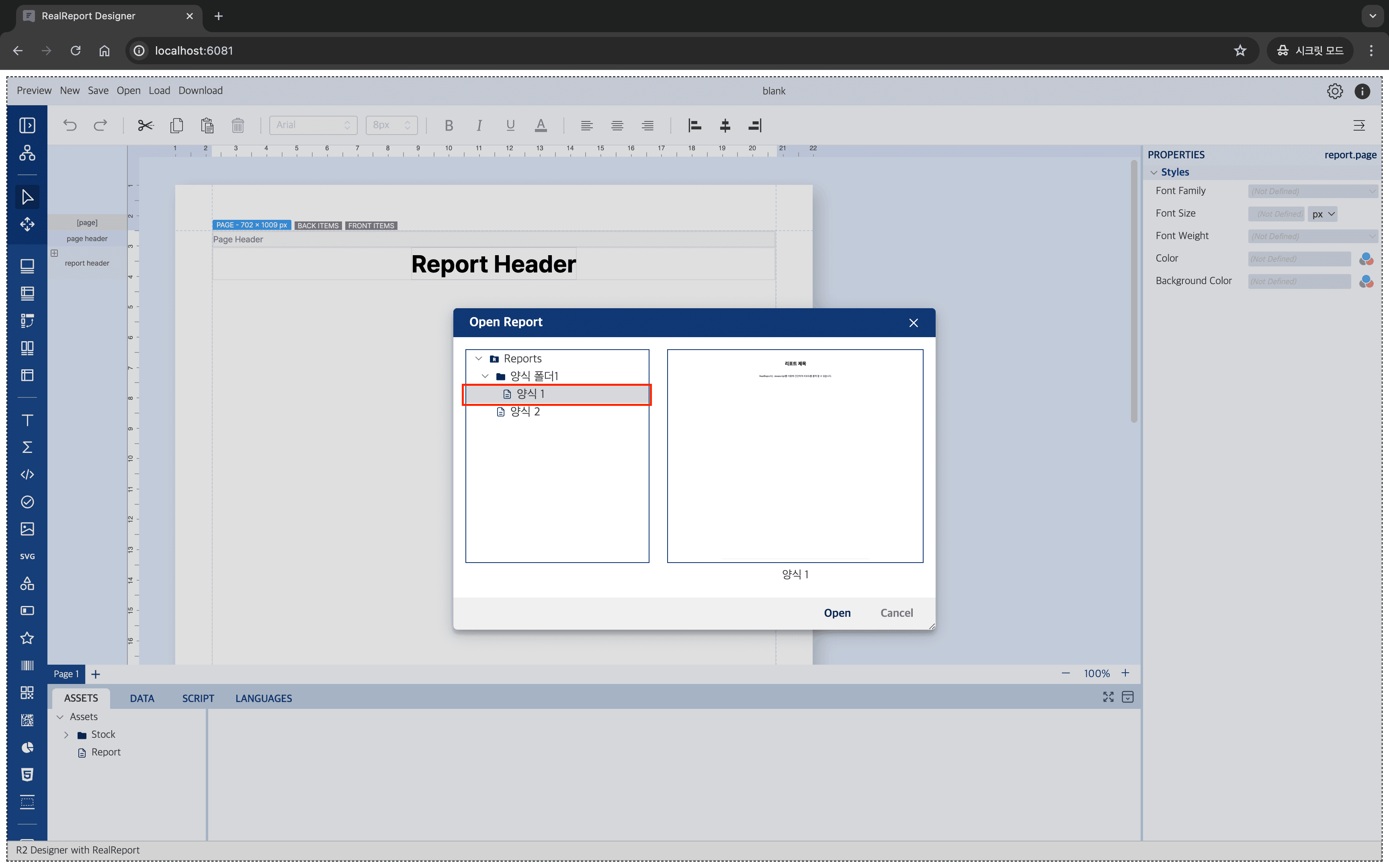
getReportCallback을 사용하여 양식 정보를 반환해주면 Open 메뉴에서 선택한 보고서 양식 정보를 불러올 수 있습니다.
코드 예시
/**
 * open 메뉴에서 선택한 양식 데이터를 제공하는 코드
 */
async function getReportCallback(reportId) {

    // 리포트 양식 데이터를 요청하는 API
    const reportTemplate = await fetchApi(
        `http://localhost:3000/api/v1/reports/${reportId}`,
    );

    return {
        id: reportTemplate.reportId, // 리포트 양식에 사용할 고유한 id 정보
        source: reportTemplate.r2Data, // 리포트 양식 데이터
    };
}

const designer = new RealReport.ReportDesigner(container, {
    getReportCallback,
});적용 모습
saveReportCallback
웹 디자이너의 Save 메뉴를 클릭할 때 호출되는 Callback
- 타입:
(report: ReportForm, reportId?: string, reportContext: ReportContext) => Promise<SaveCallbackResponse | null> ReportContext타입SaveCallbackResponse타입
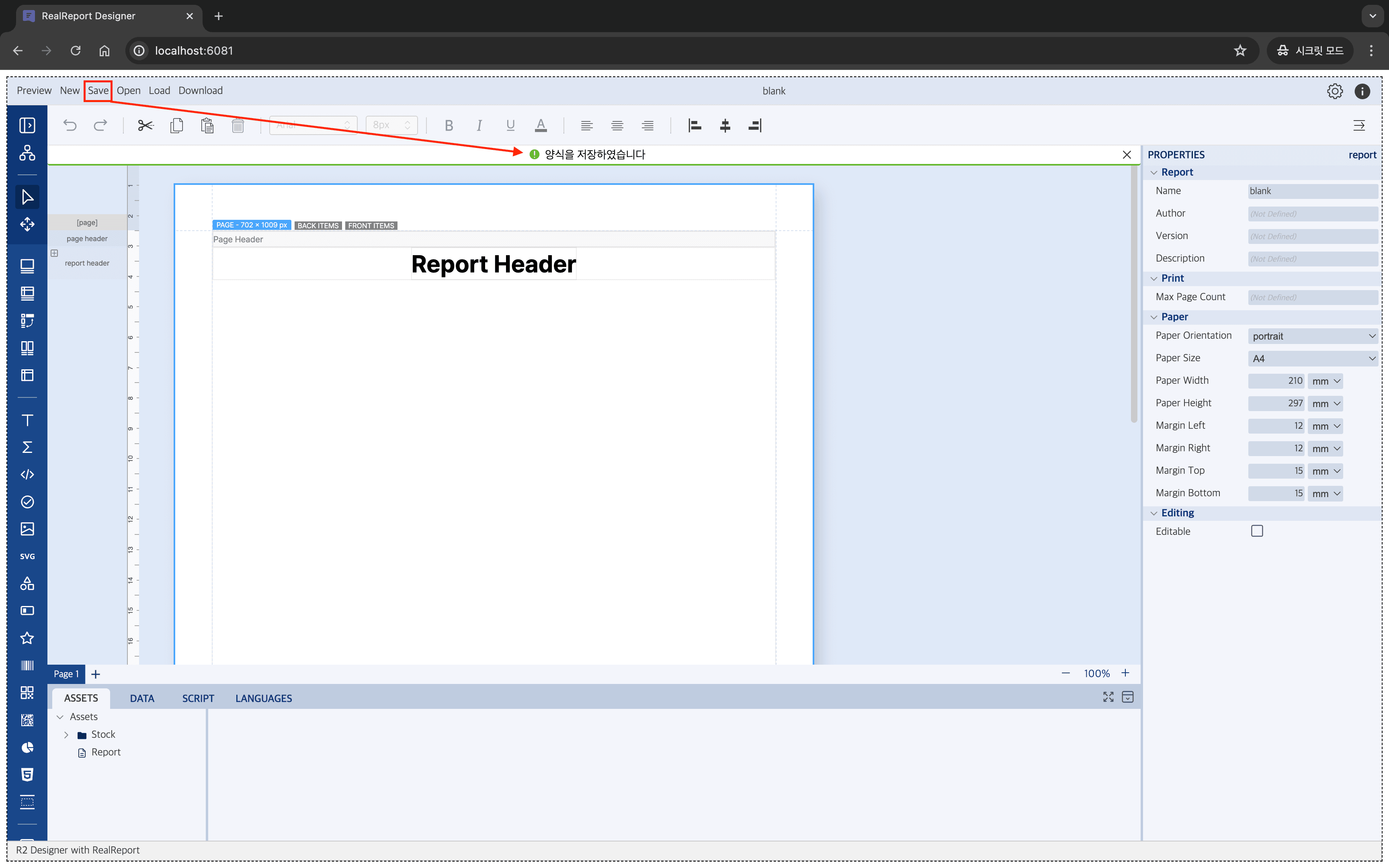
saveReportCallback을 사용하여 현재 수정중인 양식을 저장하는 핸들러를 구성할 수 있습니다.
코드 예시
/**
 * save 버튼을 클릭하면 현재 수정한 양식 정보를 저장하는 코드
 */
async function saveReportCallback(report, reportId, reportContext) {
    // 리포트 관련 정보
    console.log(reportContext)

    // 리포트 양식 데이터를 저장하는 API
    const saveResponse = await fetchApi(
        `http://localhost:3000/api/v1/reports/${reportId}`,
        'POST',
        {
            body: {
                id: reportId,
                reportData: report
            }
        }
    );

    return {
        id: saveResponse.id // 저장한 양식의 id 정보
        message: '양식을 저장하였습니다.' // 저장 성공시 메시지 내용
    };
}

const designer = new RealReport.ReportDesigner(container, {
    saveReportCallback,
});
적용 모습
속성
| 이름 | 타입 | Read & Write |
|---|---|---|
| designMode | boolean | Read & Write |
| defaulFont | string | Write |
designMode
웹 디자이너를 미리보기 혹은 디자인 모드로 설정합니다.
- 타입:
boolean - 기본값:
true - Read & Write
const designer = new RealReport.ReportDesigner(container, designerOptions);

// 디자인 모드로 실행 (기본값)
designer.designMode = true;

// 미리보기 모드로 실행
designer.designMode = false;
defaultFont
registerFonts 함수로 설정한 폰트 목록에서 기본으로 사용할 폰트 이름을 지정합니다.
- 타입:
string - 기본값:
undefined - Write
const designer = new RealReport.ReportDesigner(container, designerOptions);

designer.registerFonts([
    {
        name: 'NotoSans',
        source: 'assets/fonts/NotoSansKR-Regular.ttf',
        fontWeight: 'normal',
    },
    {
        name: 'NotoSans',
        source: 'assets/fonts/NotoSansKR-Bold.ttf',
        fontWeight: 'bold',
    },
]);

// 웹 디자이너에서 NotoSans 폰트 이름으로 defaultFont 설정
designer.defaultFont = 'NotoSans';defaultFont로 설정한 폰트 이름은registerFonts함수를 사용하여 등록한 폰트 이름과 동일해야 합니다. - PDF 내보내기 시defaultFont로 설정한 폰트를 사용합니다.
함수
| 이름 | 설명 |
|---|---|
| loadReport | 보고서 양식을 불러옵니다. |
| registerFonts | 리얼리포트 웹 디자이너에 사용할 폰트 목록을 등록합니다. |
| setReportTemplates | 리얼리포트 웹 디자이너에서 사용할 리포트 템플릿 양식을 지정합니다. |
loadReport
리얼리포트 웹 디자이너에 보고서 양식을 불러옵니다.
- 타입:
(repotForm: ReportForm, reportOptions: ReportOptions) => void
인자 정보
| 이름 | 타입 | 필수여부 | 설명 |
|---|---|---|---|
| reportForm | ReportForm | yes | 리얼리포트 json 데이터 |
| reportOptions | ReportOptions | no | 리포트 불러오기 관련 옵션 |
const designer = new RealReport.ReportDesigner(container, designerOptions);

// 보고서 불러오기
designer.loadReport(reportForm, { reportId: '1' });registerFonts
리얼리포트 웹 디자이너에서 사용할 폰트 목록을 지정합니다.
- 타입:
(repotForm: ReportForm, reportOptions: ReportOptions) => Promise<void> - 지원 폰트타입:
ttf,otf,woff
폰트의 리소스를 등록하기까지 시간이 소요되기 때문에 함수를 동기적으로 처리할 필요성이 있습니다.
만약 함수를 동기적으로 처리하지 않고 보고서 양식을 바로 미리보기 할 경우 양식 모양에 차이가 발생할 수 있습니다.
인자 정보
| 이름 | 타입 | 필수여부 | 설명 |
|---|---|---|---|
| fontSources | FontSource[] | yes | 웹 디자이너에서 사용할 폰트 정보 목록 정보 |
| defaultFont | string | no | 지정한 폰트목록에서 기본으로 사용할 폰트명칭 |
const designer = new RealReport.ReportDesigner(container, designerOptions);

// 웹 디자이너에서 사용할 폰트 등록
designer
    .registerFonts(
        [
            {
                name: 'NotoSans',
                source: 'assets/fonts/NotoSansKR-Regular.ttf',
                fontWeight: 'normal',
            },
            {
                name: 'NotoSans',
                source: 'assets/fonts/NotoSansKR-Bold.ttf',
                fontWeight: 'bold',
            },
        ],
        'NotoSans', // 기본으로 사용할 폰트 이름 지정
    )
    .then(() => {
        // 웹 디자이너에 폰트가 모드 로드된 후에 양식 로드
        designer.loadReport(reportForm);
    });
setReportTemplates
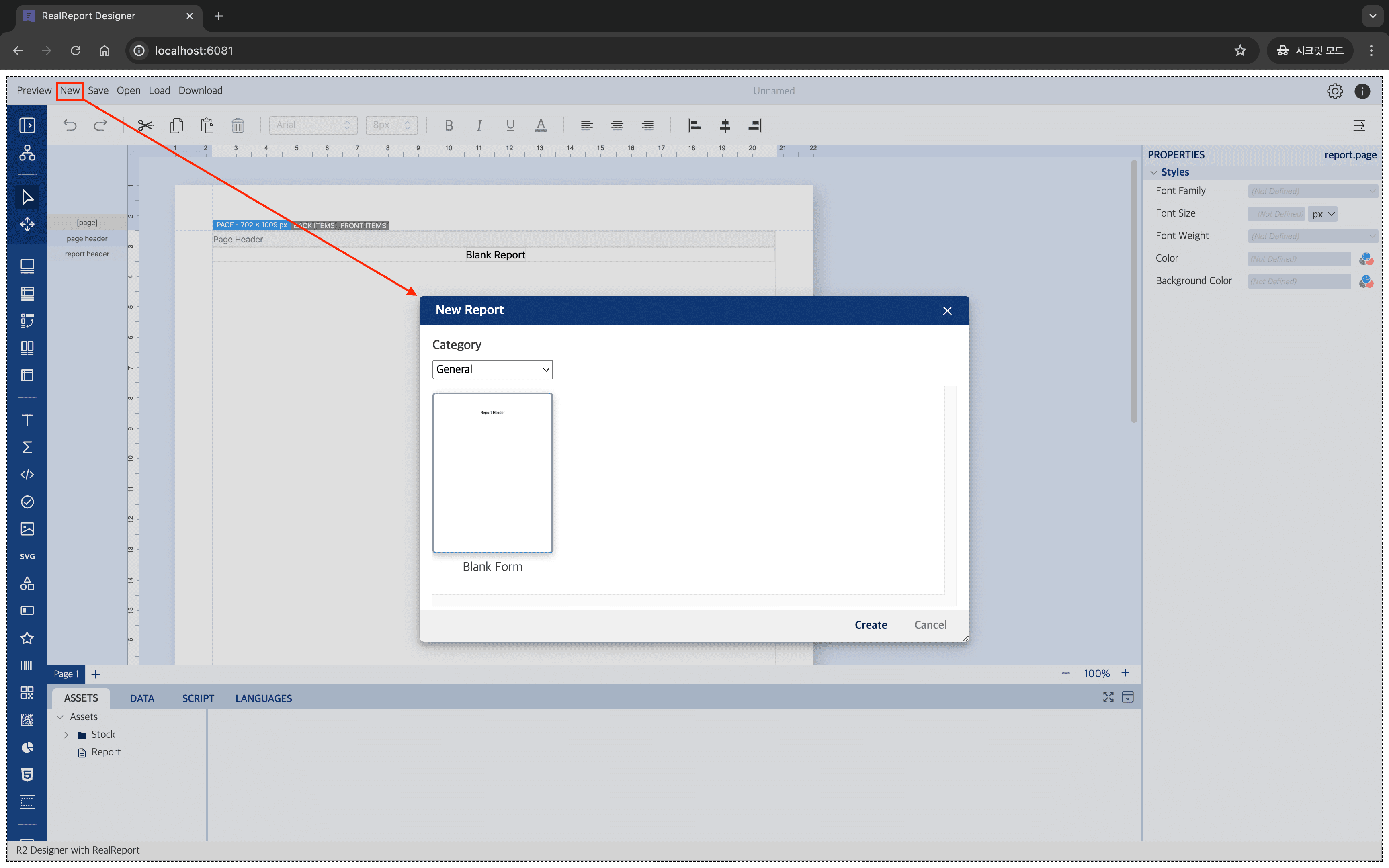
리얼리포트 웹 디자이너에서 New 메뉴 클릭시에 사용할 보고서 템플릿 양식을 구성합니다.
- 타입:
(templates: UserReportTemplate[]) => Promise<void>
인자 정보
| 이름 | 타입 | 필수여부 | 설명 |
|---|---|---|---|
| templates | UserReportTemplate[] | yes | 웹 디자이너에서 사용할 리포트 템플릿 정보 |
const designer = new RealReport.ReportDesigner(container, designerOptions);

// 웹 디자이너에서 사용할 보고서 템플릿 양식 구성
designer.setReportTemplates(
        [
            {
                category: 'General',
                templates: [
                    {
                        name: 'Blank Form',
                        thumbnail: './assets/reports/blank.png',
                        file: './assets/reports/blank.json',
                        description: '리포트 헤더만 존재하는 비어 있는 리포트입니다.',
                    }
                ]
            }
        ]
    );
적용 모습